The reason you keep losing your place in YouTube guitar lessons is that YouTube was not designed to remember where you were practicing.
YouTube has three time-related features. None of them solve this:
- “Watch later” playlists save whole videos, not positions inside them.
- Chapters are author-controlled markers for navigation, not personal saved spots.
- Shareable timestamp links like
youtu.be/{id}?t=42jump you to a specific second, but only once — they don’t loop, don’t have an end time, and don’t survive a re-share.
For guitar practice you need something different: two timestamps per spot (start + end), a name, and a place to put them that survives between sessions.
Why one timestamp isn’t enough
A single timestamp is a navigation aid. You jump to 0:42 in the lesson, watch the riff once, then have to scrub back to 0:42 to watch it again. Twenty reps means twenty manual scrubs.
Two timestamps — A and B — is a practice loop. You jump to 0:42, the video plays to 0:51, jumps back to 0:42, plays to 0:51, jumps back to 0:42, forever. Twenty reps means tapping play once.
The difference between “I saved the timestamp” and “I saved the loop” is the difference between watching a riff and drilling it.
How to save a YouTube lesson section as a loop
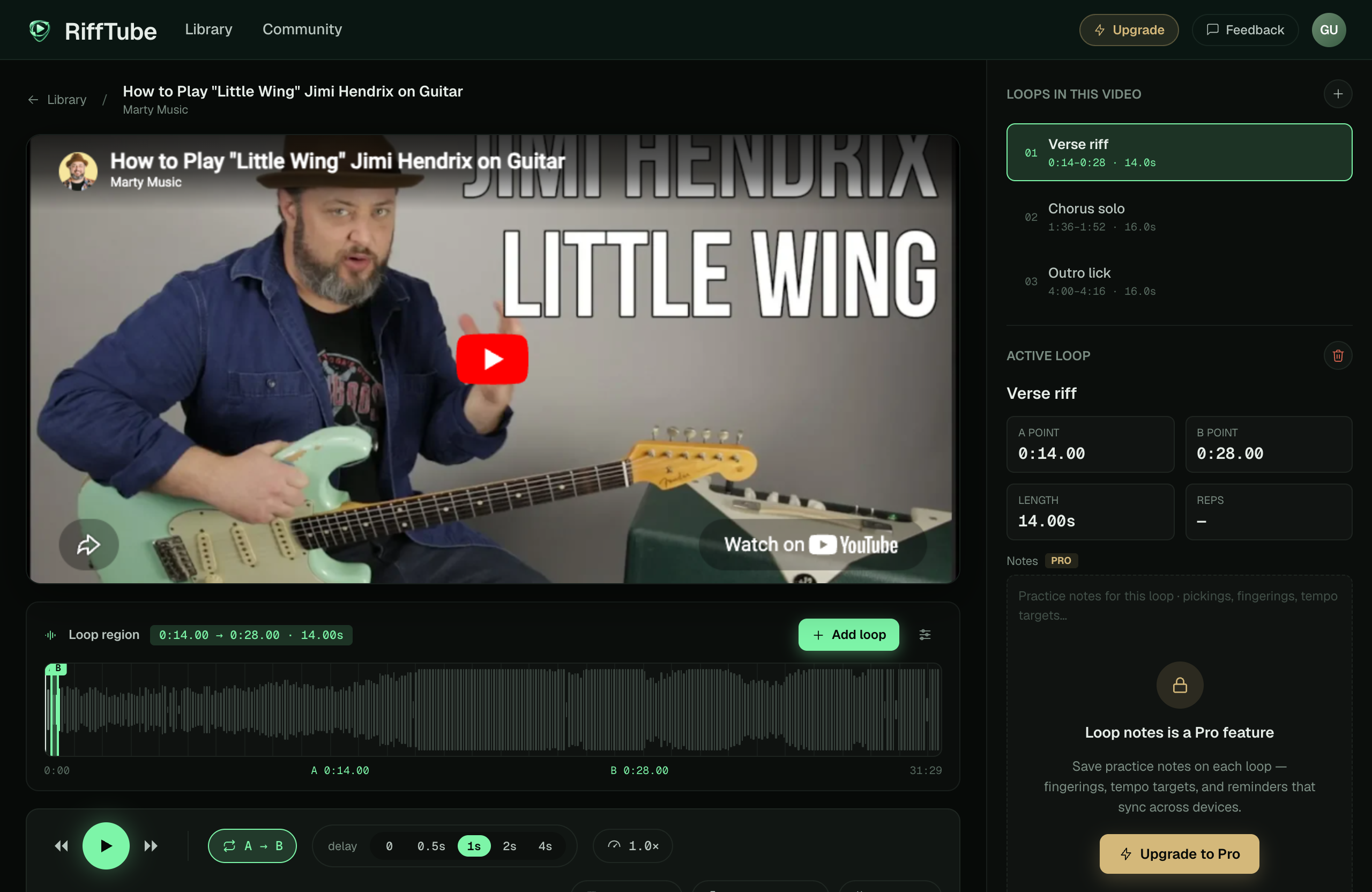
In RiffTube (free, iPhone + web):
- Paste the lesson URL.
- Play to the start of the section, tap A.
- Play to the end of the section, tap B.
- Name the loop — “verse riff,” “bend at 0:42,” “outro run.” Optional but worth doing once you have more than one loop per video.
- Close the app.
The loop is now saved against that video, in your account. Open the app tomorrow, find the video in your library, tap the loop. You’re drilling reps in under five seconds.
Multiple saved sections in one lesson
Most guitar lessons have 3–6 sections worth drilling separately: the main riff, a fill, a turnaround, maybe a solo. You don’t want one massive loop covering all of them — you want a named loop per section so you can rotate between them as your hands warm up.
A practical practice library for a single song lesson looks like this:
- Verse riff — 0:43 to 0:52
- Chorus rhythm — 1:14 to 1:24
- Solo phrase 1 — 2:08 to 2:14
- Solo phrase 2 — 2:14 to 2:21
- Outro lick — 3:30 to 3:38
Five saved positions in one video. Each one a loop, each one named, each one one tap away.
What about copying timestamps into a notes app?
People sometimes try to fake this with a notes file: “Mary’s lesson, drill 0:43, 1:14, 2:08.” That works for a couple of videos and falls apart at five. The friction of opening the notes app, copying the timestamp, switching to YouTube, scrubbing to the right second, every single time, is enough that most people stop drilling after a week.
A saved-loop tool moves the friction down to “tap the loop name.” That’s a small enough delta that the practice habit actually sticks.
When the timestamp is the wrong abstraction
Sometimes you genuinely don’t need a loop — you need a marker. “This is where the bridge starts.” For that, a YouTube chapter link or a copy-pasted timestamp is fine.
But for anything you’re trying to play — not just find — you want the loop, not the timestamp. Two numbers, not one. Save once, drill forever.